What is Amazon PPC search-term discovery?
Search-term discovery is the process of finding customer searches and product targets that have already converted for you and are therefore worth targeting directly.
These opportunities come from automatic, broad and phrase match types. Amazon has already tested them through your Amazon sponsored ads and shown that they convert for you. Your job is to identify them and start to target them directly so that you can optimise them and maximise their potential.
If you're looking for Amazon PPC help after the basics are already in place, this is the advanced Amazon PPC habit that keeps the account growing. It is especially useful for Amazon seller PPC accounts where new customer searches appear over time.
Repeat this process once a month. That gives discovery campaigns enough time to find useful traffic while ensuring profitable targets do not remain hidden for too long.
Amazon Ads how to: download a 60-day Search Term report
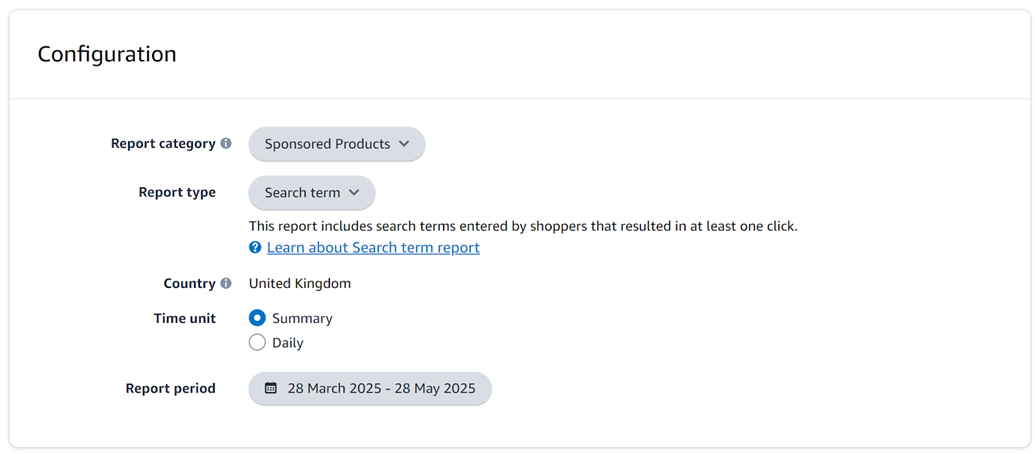
In Amazon Ads, go to Measurement and reporting, open Sponsored ad reports, and create a Sponsored Products Search Term report. Use Summary as the time unit and set the date range to the previous 60 days.
If you're learning how to use Amazon Ads, this is one of the most important reports to understand. It shows the actual customer searches and product pages behind your Amazon pay per click ads, which makes it essential for anyone learning how to do Amazon PPC properly.
These rows are useful Amazon advertising examples because they come from your own account rather than a generic keyword tool. They show how shoppers actually found your product through Amazon advertising.
Now, open the report in Excel or Google Sheets and sort 7 Day Total Sales from largest to smallest.
Compare converting search terms with your existing target list
If you've followed the masterclass series, you should already have a list of keywords and ASINs that you're targeting. If you don't yet have that list, you need to create one. It should include every keyword and ASIN that you are currently targeting in your campaigns, read part one of this masterclass How to Setup Amazon PPC For Success to see how to create it.
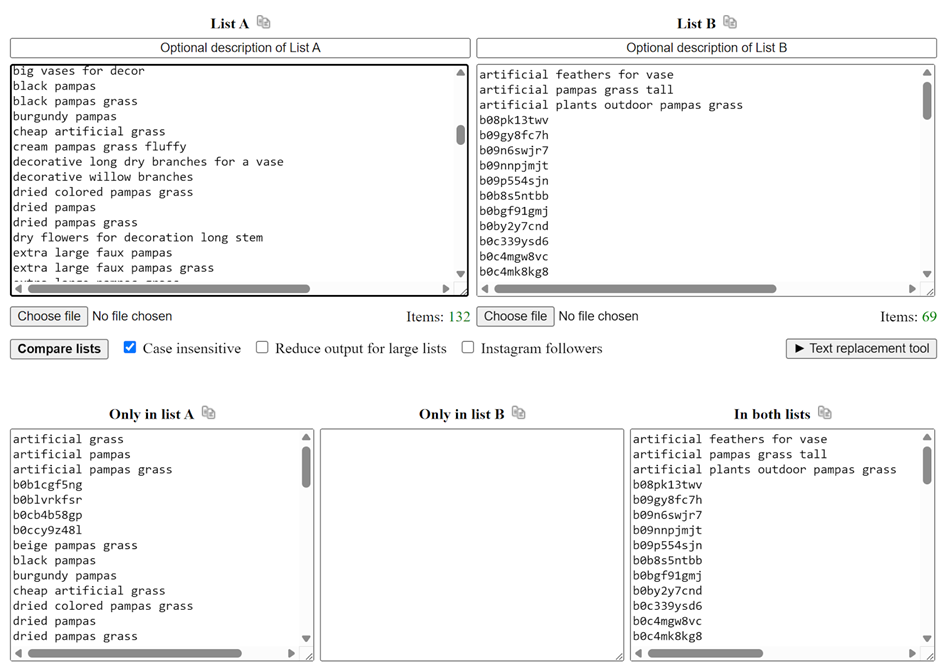
Once you have the list, go to Compare Two Lists. Copy the search terms from the Search Term report that have sales and paste them into list A. Copy your master list of keywords and ASINs and paste them into list B. Click Compare lists and look at the result in Only in list A, these are your new targets.
Keep note of what they are and add them to your master list so they are not rediscovered and processed again next month.
This process is designed to find evidence-backed opportunities. A relevant-looking search without sales can remain in discovery until it proves that it converts.
Next, split the new values into keywords and ASINs. Values beginning with B0 are normally product targets. Everything else should be treated as a keyword.
Target every new keyword in your Amazon PPC ads campaign
Now you need to add your new keywords to your campaigns, you should add them to be targeted by all 3 match types:
- Exact
- Phrase
- Broad
If you've been following the masterclass series, you should follow the same pattern we set up in the campaign structure section for adding keywords. If you haven't then add them to your existing structure. This is the practical answer to how to use PPC on Amazon once a search term has already proven it can make sales.
Broad and phrase targeting continue discovering related searches. Exact targeting gives you direct control over the search term that has already made a sale. Splitting them up allows us to optimise them more effectively.
Use the keyword's CPC from the Search Term report as its starting bid. Your weekly optimisation process can then adjust that bid as more data arrives.
Target every new ASIN in Amazon Sponsored Products
Similarly to keywords above, you should target every new ASIN with both expanded and exact match types. This is how to advertise Amazon products based on a product that has already sent you converting traffic.
Expanded targeting allows Amazon to keep finding related product-page opportunities. Exact targeting lets you bid directly on the ASIN that has already generated a sale.
Again, start with the CPC from the Search Term report. Then allow the weekly bid optimisation process to increase or reduce the bid according to performance.
| New target | Add to discovery | Add to controlled performance |
|---|---|---|
| Keyword | Broad and phrase match types | Exact match type |
| ASIN | Expanded match type | Exact match type |
Conclusion: turn discovery into a monthly growth habit
Every month, find the search terms and ASINs that made sales, remove anything already on your master list, and add the remaining targets to discovery and exact campaigns at their report CPC. This turns proven customer demand into targets you can control, optimise and scale.
This monthly process completes the Amazon PPC Masterclass system. Your campaign structure gives every target a clear purpose, weekly bid optimisation keeps spend focused on profitable traffic, and search-term discovery continually feeds new opportunities back into the system.
Keep testing and adjusting your target ACOS as your margins, goals and market conditions change. The right target is not simply the lowest ACOS; it is the point that produces the greatest overall profit for your business.
With these three practices working together, Amazon PPC becomes more than a collection of campaigns. It becomes a repeatable Amazon advertising system that learns from performance, improves over time and helps you scale profitably.
Find new profitable search terms with automated Amazon PPC
Osellpa identifies new converting keywords and ASINs, adds them to the right campaigns and continues optimising their bids as performance data grows for you automatically.


